Run your first scan
From a cold install to a board-ready report, with the real screens at every stage. Plan on about thirty minutes the first time through.
CVEasy AI runs entirely on your Mac. There is no cloud account to provision, no agent to deploy on a server, and no data leaving your hardware. This walkthrough takes a brand new install all the way through the workflow a security team actually runs: get data in, read your risk, triage what matters, prioritize the fixes, prove what is actually exploitable with BASzy, and report it to leadership. Every screen and clip below is the shipping application, captured on a demo workspace.
The Integrations module, showing all 152 connectors across 16 categories and the three inbound lanes. Nothing to install and no card required.
Integrations →1. Install and launch
Download the DMG from your purchase confirmation, drag CVEasy AI into Applications, and open it. There is no Homebrew, no Python, and no command line. On first launch the app seeds its CVE database, starts the built-in AI engine, and walks you through a short setup wizard.
The wizard verifies the three core components before you do anything else: the AI Engine, the security-tuned AI Model, and the local Database. When all three read Ready, click Continue.
2. Activate your license
Open Activate CVEasy AI from the prompt on first run, or later from the Activate link at the bottom of the sidebar. Enter the email you used at checkout and CVEasy retrieves the license issued to that purchase and fills it in; click Activate This Machine and you are licensed. You can also paste the key from your confirmation email directly (keys look like CVEASY-XXXXX-...). Activation is per machine.
3. Tell CVEasy about your organization
This step is easy to skip and worth doing. Your industry, compliance frameworks, and asset categories feed directly into how risk is scored. A vulnerability on a HIPAA-regulated clinical system should not rank the same as the identical CVE on a lab workstation, and once your profile is set, it does not.
Open Settings under the Manage group in the sidebar. Set your company name, pick your industry, and toggle on the frameworks you answer to (HIPAA, SOC 2, PCI-DSS, and so on). Save.
4. Point CVEasy at your data
There are three ways in: connect a tool over its API, drop a scan file, or let BASzy discover assets itself. Connector setup is one short form per source. Pick the tool, paste the fields listed below, click Save & Pull. The field lists are printed in full because they fit.
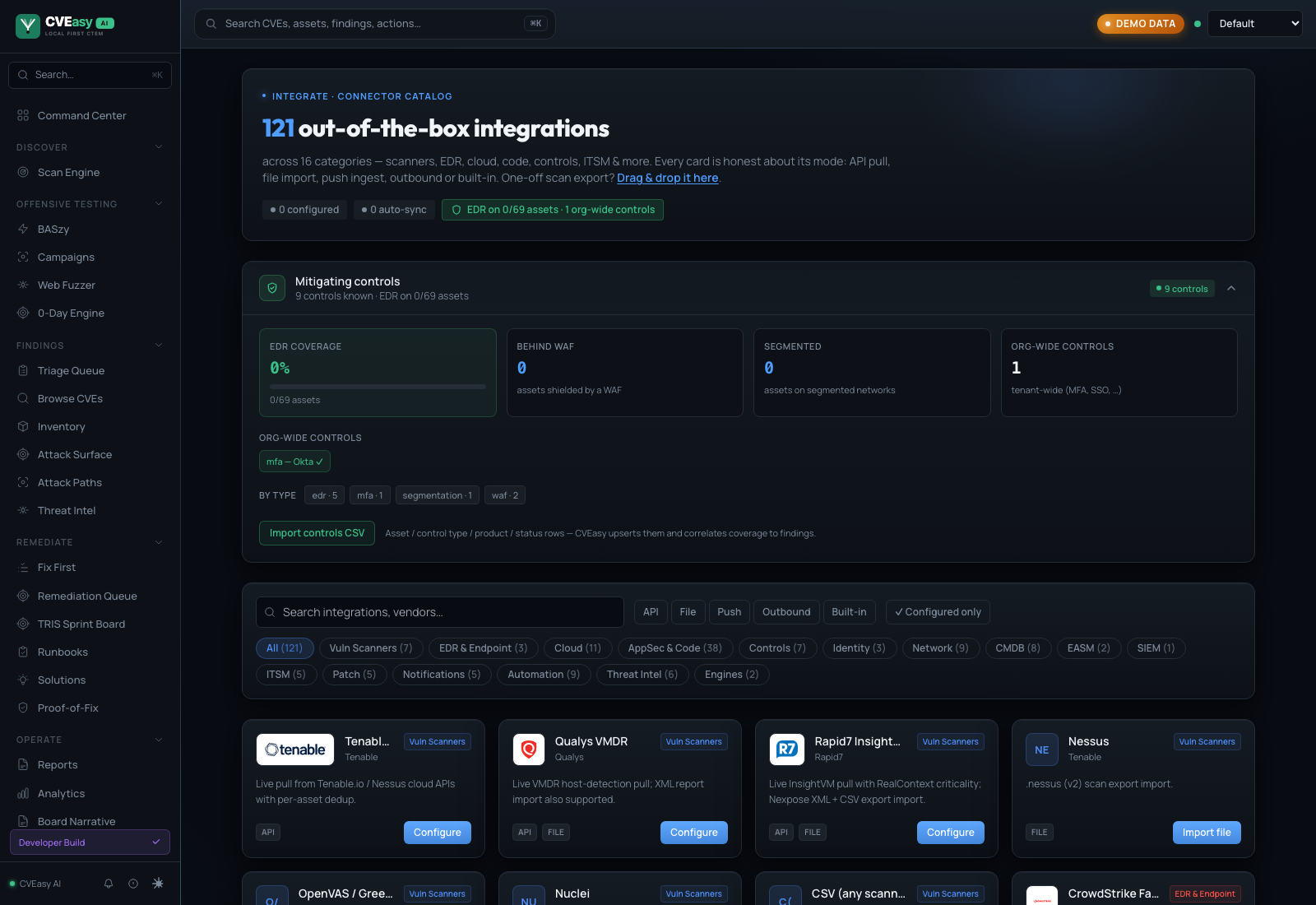
The Connectors catalog. 152 integrations across 16 categories. Each card states its mode: API pull, file import, push, outbound, or built-in.
Path A. Connect a scanner or EDR
73 native API connectors pull findings directly, with full asset identity and no export files. The six below are where most teams start. Test verifies the credentials, Save & Pull ingests immediately, and Schedule keeps everything current, from every 15 minutes to daily. Credentials are AES-GCM encrypted and scoped to the workspace.
 Rapid7 InsightVMAPI
- API keyREQUIRED
- Region (us·eu·ca·au·ap)REQUIRED
- API URL overrideOPTIONAL
- Asset scope filterOPTIONAL
- InsightIDR lookbackOPTIONAL
 CrowdStrike Falcon SpotlightAPI
- Client IDREQUIRED
- Client secretREQUIRED
- API URLOPTIONAL
 Tenable.io / NessusAPI
- Access keyREQUIRED
- Secret keyREQUIRED
- API URLOPTIONAL
 Qualys VMDRAPI
- UsernameREQUIRED
- PasswordREQUIRED
- API URLREQUIRED
 SentinelOne SingularityAPI
- API tokenREQUIRED
- Management URLREQUIRED
 Microsoft Defender for EndpointAPI
- Azure tenant IDREQUIRED
- App client IDREQUIRED
- Client secretREQUIRED
- Cloud (commercial·gcc)OPTIONAL
Every card in the catalog uses the same grammar: paste the fields, Test, Save & Pull. Auto-sync runs on the schedule you pick.
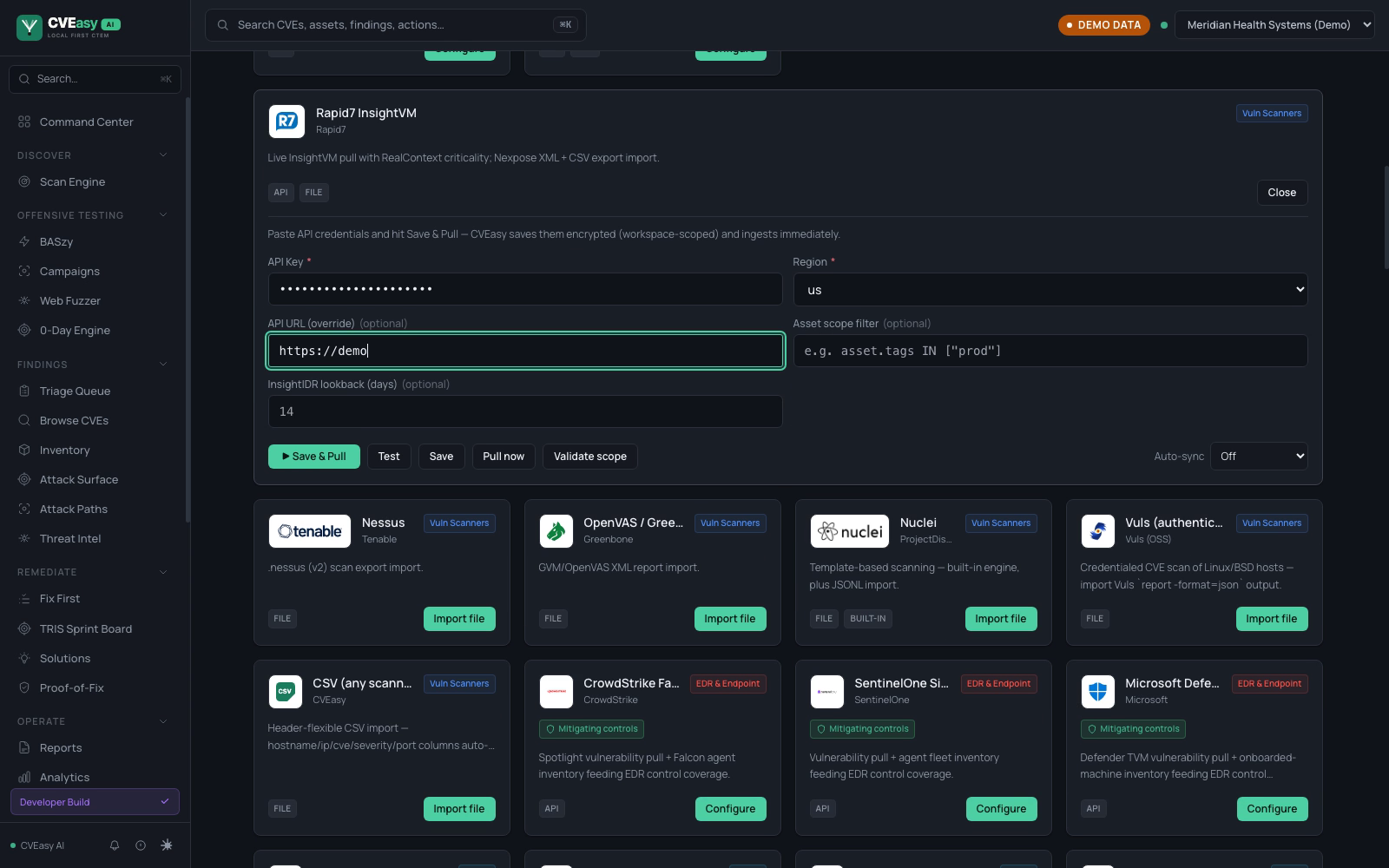
Rapid7 InsightVM. One API key and a region. The URL override, asset scope filter, and InsightIDR lookback are optional. Save & Pull stores the credentials encrypted and ingests immediately.
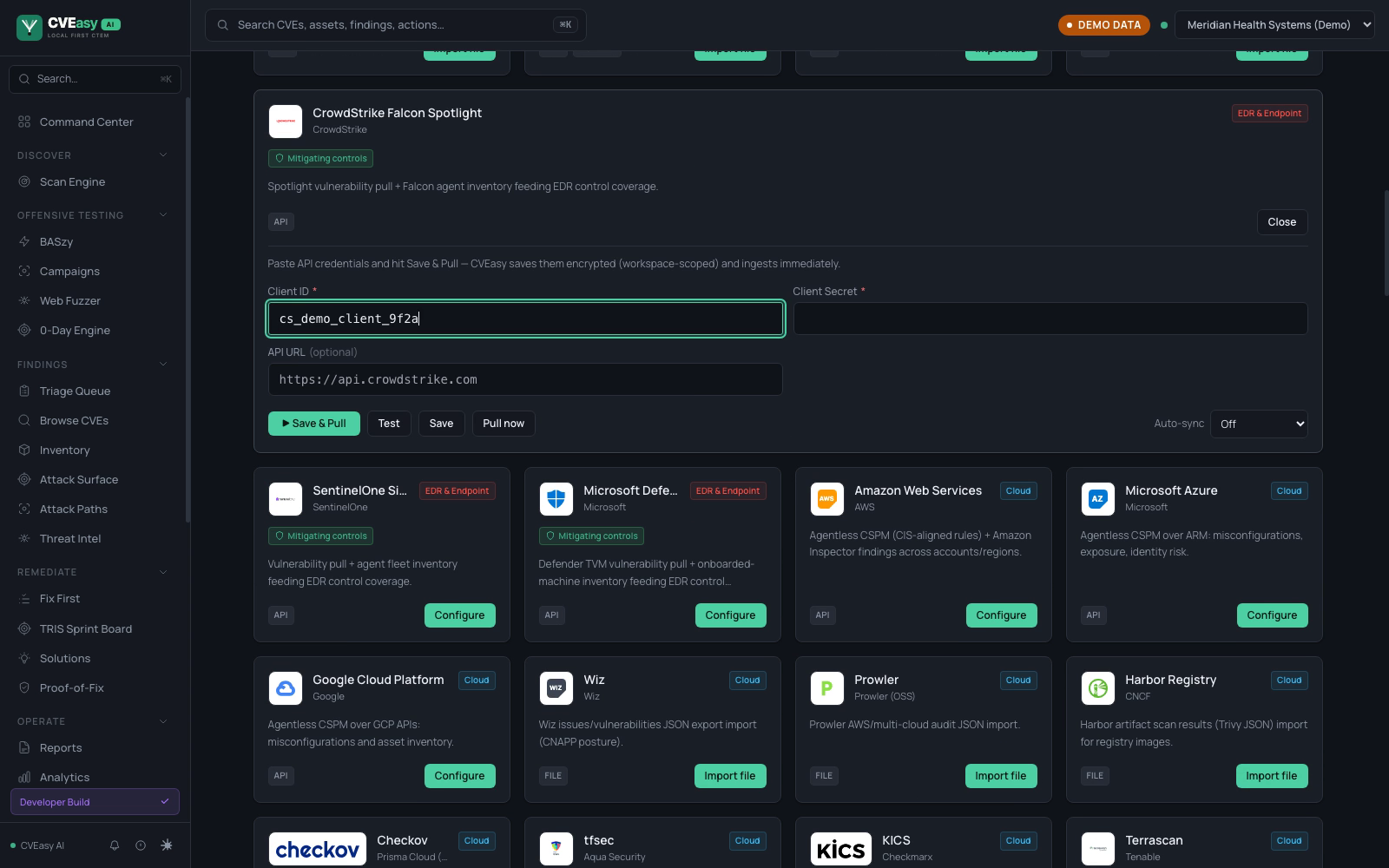
CrowdStrike Falcon Spotlight. Client ID plus secret. Spotlight vulnerabilities and Falcon agent inventory arrive with EDR control telemetry that feeds TRIS defense-efficacy scoring.
Connect a second source and the same exposure reported twice becomes one work item. Findings deduplicate on IP, hostname, MAC, and agent UUID, so three tools reporting the same host produce one asset with one TRIS score. Teams average around a 75% reduction in ticket volume from the merge.
Path B. Drop a scan file
Open Integrations under Integrate and use the Scan Imports tab, or drag the export straight onto the drop zone. CVEasy auto-detects 38 formats, so you never tell it which scanner produced the file. Anything that can POST a file can also push to the webhook ingest API on a schedule.
On import, CVEasy does five things automatically:
- Creates an asset for every host in the scan
- Links each finding to its CVE, with port and CVSS data
- Fetches any CVE not already in the local database from NVD
- Computes a TRIS score for each CVE on each asset
- Updates your attack surface and dashboards immediately
Path C. Discover with BASzy
Without a scanner, BASzy builds the inventory itself. Open BASzy under Offensive Testing, enter an authorized network range such as 10.0.0.0/24, and start. BASzy enumerates live hosts, fingerprints services, and tests for exploitable conditions, no third-party scanner required.
5. Read your Command Center
The moment data lands, the Command Center becomes your home base. The top row is your posture at a glance: assets tracked, open findings, criticals and highs, your BAS validation score, and how many threat actors are targeting what you run. Below it, the Priority Queue already sorts your findings by real risk, not raw CVSS, so the first thing you see is the thing to do first.
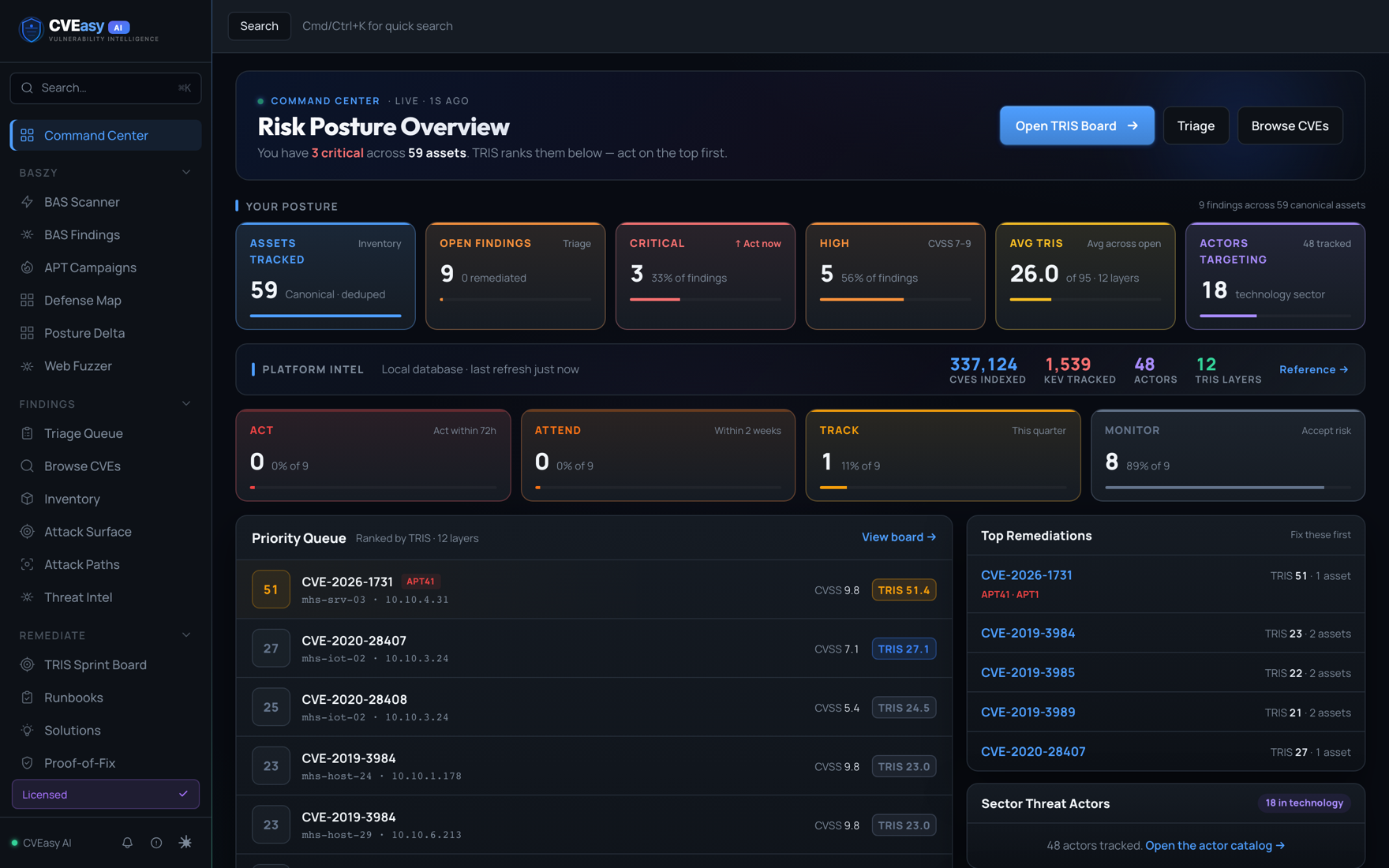
Command Center. Captured from a real install, so the counts are whatever that build held on the day. The demo workspace two connectors after install: 42 deduplicated assets, the priority queue ranked by TRIS with KEV pinned on top, and the actors targeting this sector on the right.
Open it live Click through the Command CenterThe same screen this page describes, current with the shipping build: posture strip, platform intel, and a TRIS-ranked priority queue you can drill into.
Command Center →6. Open a finding
Click any CVE, or open Browse CVEs under Findings to search the full catalog of 361,000+ CVEs by ID, product, or keyword. Filters for Critical, High, KEV, and TRIS band let you cut to what matters.
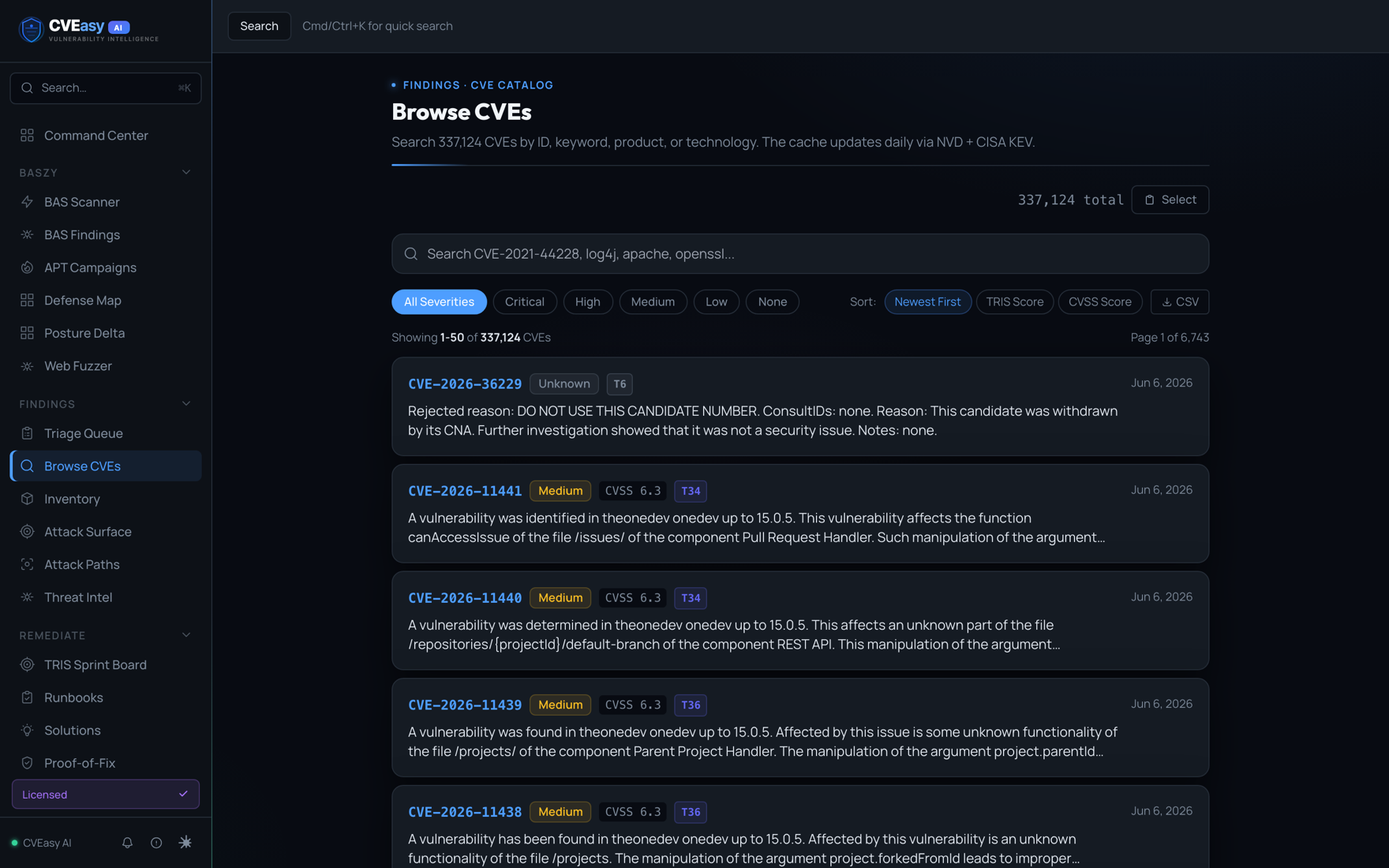
Browse CVEs. The full catalog, searchable and filterable, updated from NVD and CISA KEV.
The CVE detail page is where CVEasy separates signal from noise. CVSS is one number on it, not the verdict: you also get the EPSS percentile, an active CISA KEV listing with the federal remediation deadline, attacker pressure scoring, public exploit maturity, and the compliance frameworks the CVE puts at risk. The TRIS ring folds all of it into the one number the rest of the app ranks by.
7. Work the Triage Queue
Open Triage Queue under Findings. This is your kanban for vulnerabilities: every CVE moves through New, Triaged, Assigned, Mitigating, and Resolved. The counts across the top tell you the shape of your backlog at a glance, and overdue items are flagged so nothing quietly slips.
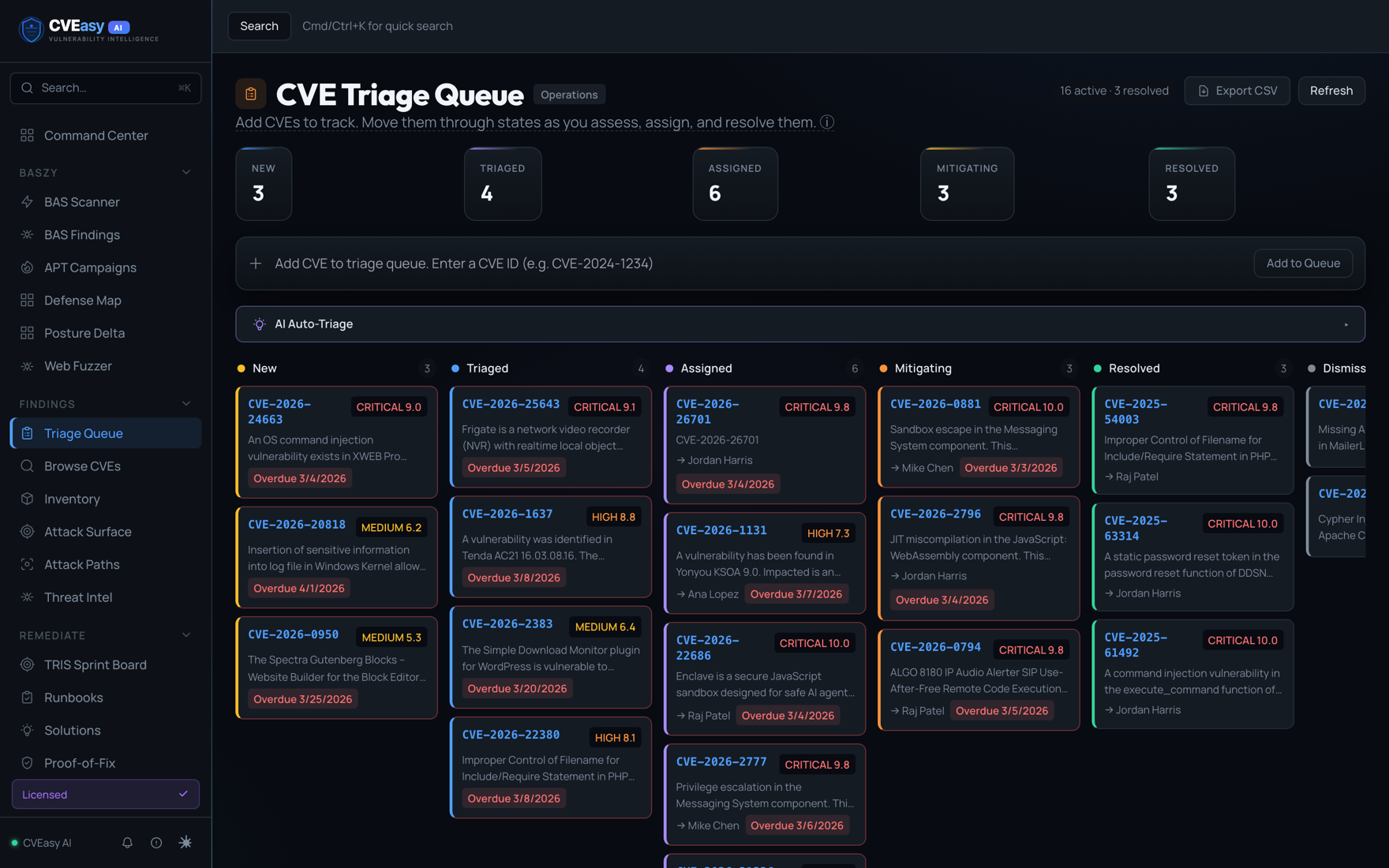
Triage Queue. Drag a CVE across columns as it moves from discovery to fixed. AI Auto-Triage can suggest the next state for you.
Open it live Move a CVE across the triage boardSix columns from New through Dismissed, with the CVE catalog and its TRIS column one click away under Browse CVEs.
Triage Queue →8. Prioritize with the TRIS Sprint Board
Open TRIS Sprint Board under Remediate. Findings are sorted into action bands by their TRIS score, and each band carries a real timeframe:
- ACT Patch within 72 hours. Actively dangerous right now.
- ATTEND Patch within two weeks. High priority, schedule it this sprint.
- TRACK This quarter. Real, but not on fire.
- MONITOR Watch for change. Low risk today.
Click any score chip for the full 12-layer breakdown of why a finding landed in its band. Want the full asset picture while you plan? Inventory under Findings is the canonical registry of every host, auto-deduped across scans, BAS, and connectors, with the CVE, critical, and KEV counts per asset.
9. Validate the finding with BASzy
This is the step that separates CVEasy from a scanner. A scanner tells you a CVE is present. BASzy tells you whether it is actually exploitable in your environment, by safely running the real attack technique against the target. Open BASzy under Offensive Testing, point it at an authorized target, and run an agentless simulation.
When the run finishes, every finding carries a verdict. EXPLOITED means BASzy proved the attack worked and chained it to real impact, and those rise to the top of your TRIS scores. Findings it could not exploit drop down the list, so you stop spending sprints on vulnerabilities that were never reachable. Each result keeps its MITRE technique, target, and linked CVE.
Proven findings chain into the Attack Paths graph under Findings. The lanes run from internet-facing entry points to crown jewels, so you see which exploitable finding actually reaches the data that matters.
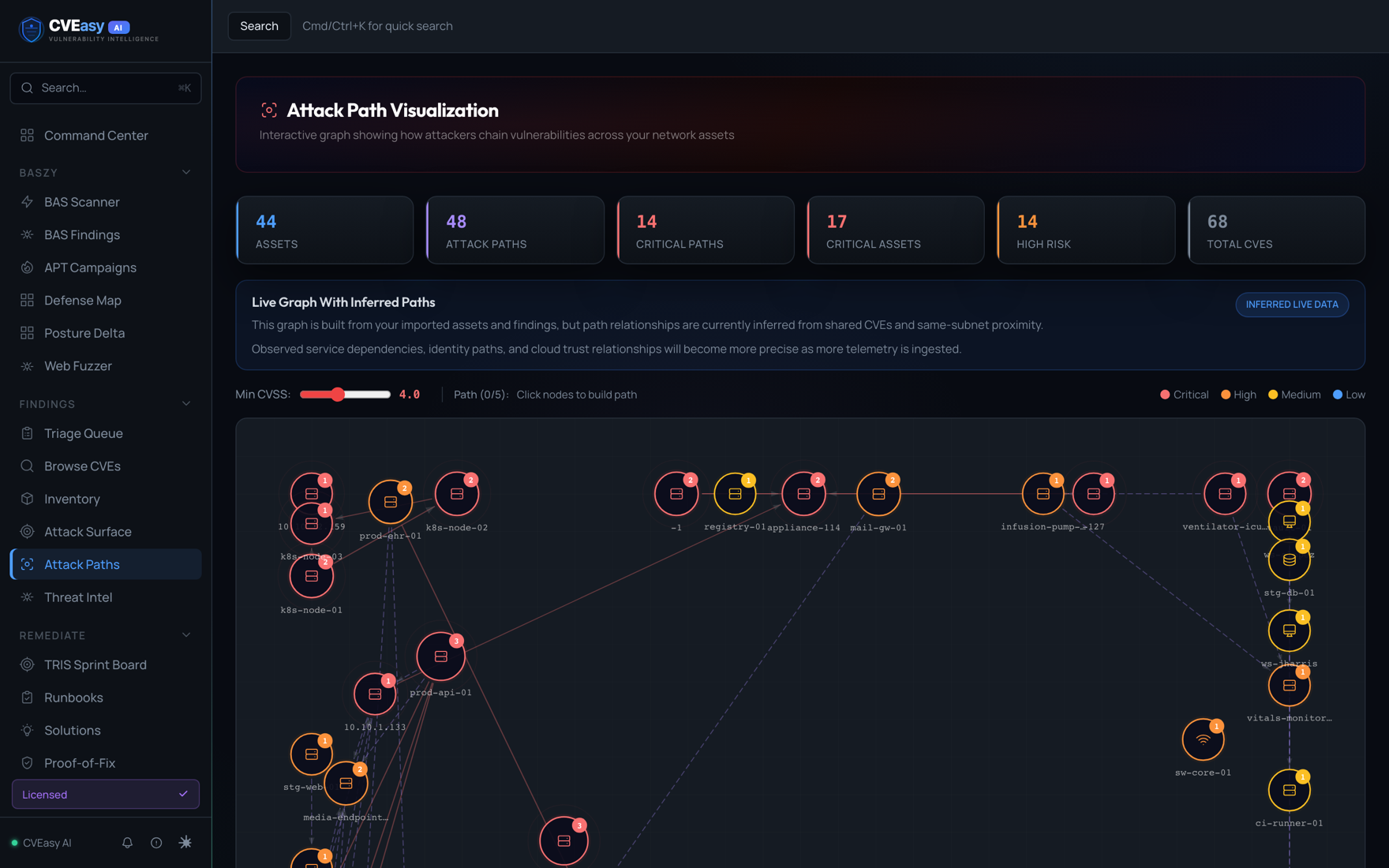
Attack Paths. 38 assets, 12 chained paths, 10 critical. Nodes are your real hosts; the red lanes are the routes an attacker would take.
Open it live Follow a path to the domain controllerThe inferred attack-path graph, plus the BASzy campaign replay where a blocked step makes the engine re-plan instead of stopping.
Attack Paths →Then prove the fix. After you remediate, Proof-of-Fix re-runs the exact same attack. When the verdict flips from EXPLOITED to blocked, CVEasy seals an HMAC-signed attestation you can hand an auditor. Prove it is exploitable, fix it, prove it is fixed.
10. Generate a report
Open Reports under Operate. Pick the audience and CVEasy builds it: an Executive Summary for leadership, Technical Findings for engineering, a Remediation Roadmap grouped by priority band, plus Attack Simulation, Patch Compliance, and a Board Narrative. Every report opens as clean HTML you can share, and most export to PDF in one click.
That is the loop: get data in, read your risk, triage, prioritize by TRIS, prove exploitability with BASzy, fix, and report. When you are ready to push fixes instead of just reporting them, open Fix First under Remediate: work orders grouped by fix, ranked by TRIS, with Push Now, Schedule, and Ticket actions wired to your patch consoles and ticketing systems. Run the loop weekly.
Open it live Work the ranked fix listFix First with its ranked actions, and the Reports module beside it where the same data becomes an executive or auditor document.
Fix First →