CVEasy AI documentation
Set up, configure, and run CVEasy AI, the first complete CTEM platform on Apple hardware. Installation, the connect-score-validate-fix loop, every feature, and a full FAQ.
Get data in
Connect a scanner or EDR Webhook ingest API Import scan data Run network discoveryRank what matters
TRIS 12-layer scoring Run BASzy campaigns View attack surfaceWhat CVEasy does that a scanner doesn't
Most tools stop at a list of vulnerabilities. CVEasy proves which findings are exploitable, generates the exact fix, and proves the fix held. Jump to any capability below.
BASzy validation
Prove exploitability by running the real attack technique against the target.
TRIS 12-layer scoring
Rank by real risk, weighted across 12 layers. Patent pending.
Proof-of-fix
HMAC-signed attestation an auditor verifies offline.
AutoFuzz zero-day
Mutation fuzzing that finds smuggling-class zero-days.
Posture delta and rules
Export a Sigma, Splunk, or Sentinel rule for every gap.
Attack path graph
See the chained path an attacker takes to your crown jewels.
Local-first and air-gap
Runs 100% on your Mac. Your data never leaves.
Fix once, close many
Root-cause Solutions retire thousands of CVEs at once.
Installation and setup
Download the DMG
Download CVEasy AI_1.0.0_aarch64.dmg from your purchase confirmation email. The file is approximately 5GB, it includes everything needed to run offline.
Install to Applications
Double-click the DMG and drag CVEasy AI™ to your Applications folder. That's it, no Homebrew, no Python, no command line.
Launch
Open CVEasy AI from Applications. On first launch, it will seed the database with 361,000+ CVEs (takes about 15 seconds) and start the AI engine automatically.
Activate your license
Go to Settings → License and enter the email you used at checkout. CVEasy retrieves the license issued to that email, fills it in, and Activate This Machine finishes the job. If you prefer, paste the key from your confirmation email directly; keys look like CVEASY-XXXXX-....
First steps after installation
Once CVEasy AI is running, start with one of these:
Option A: You have existing scan data
If your team runs Nessus, Qualys, Rapid7, or any other vulnerability scanner, import your most recent scan:
- Click Scan Imports in the sidebar
- Click Import Scan
- Upload your scan file (drag & drop or file picker)
- CVEasy auto-detects the format, creates assets, and links CVEs
Option B: You don't have scan data
No scanner? No problem. BASzy discovers your assets automatically:
- Click BASzy in the sidebar
- Click New Scan
- Enter your network range (e.g.,
10.0.0.0/24) - BASzy™ scans the network, discovers assets, and tests for vulnerabilities
Connect a scanner or EDR
See the Integrations module in the demo →The Connectors catalog carries 152 out-of-the-box integrations across 16 categories (vuln scanners, EDR, cloud, AppSec & code, identity, controls, network, CMDB, EASM, SIEM, ticketing, patch, and more). Every card is honest about its mode: API pull, file import, push ingest, outbound, or built-in.
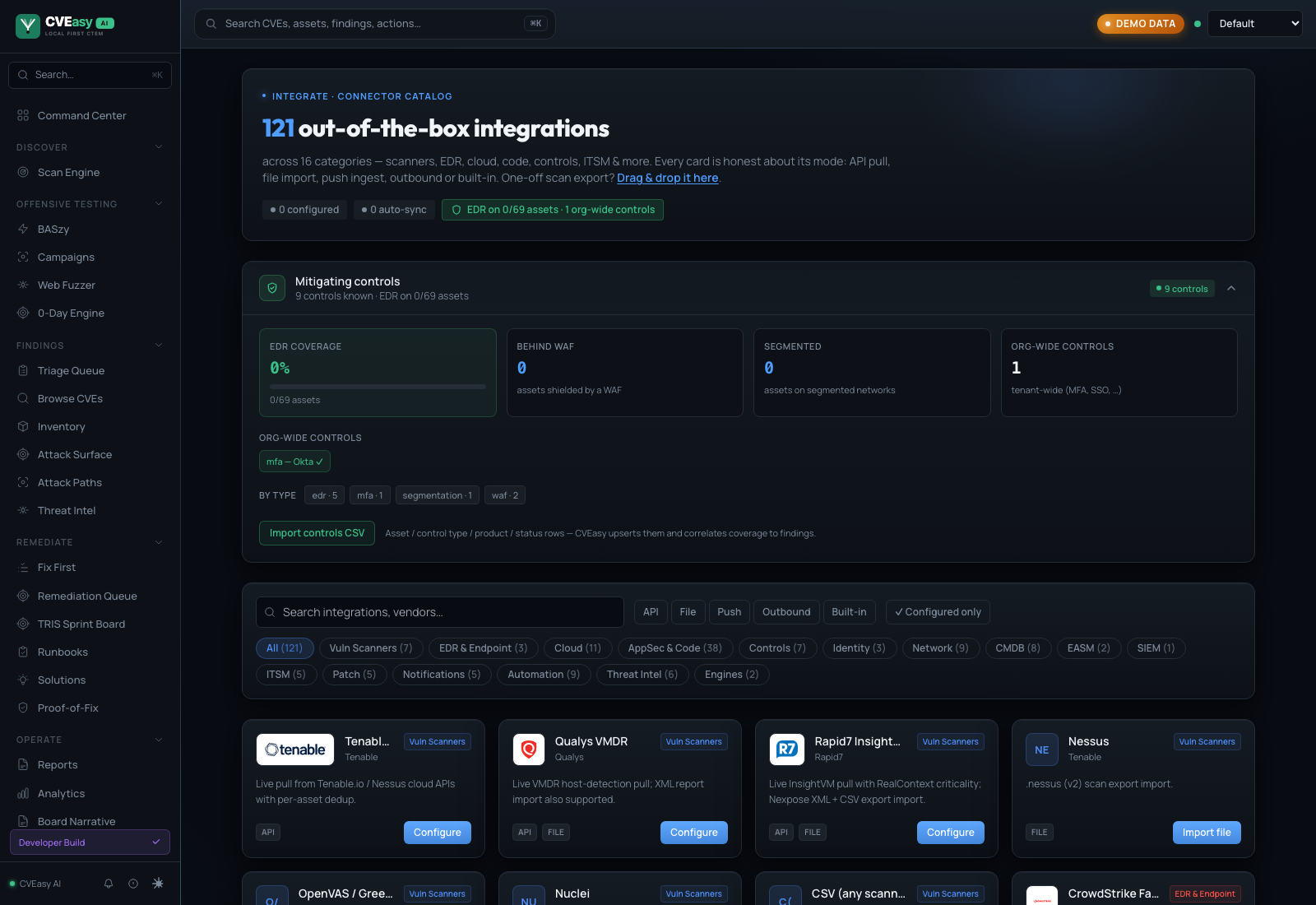
Connectors catalog. 152 integrations, filterable by category and mode. The mitigating-controls panel up top feeds TRIS Layer 10.
The native API connectors pull findings directly from the vendor's API, with full asset identity and no export files. To set one up:
- Open Connectors under Integrate and pick your vendor (for example Rapid7 InsightVM, Tenable.io, Qualys VMDR, CrowdStrike, SentinelOne, or Microsoft Defender TVM).
- Paste the API credentials. They are AES-GCM encrypted at rest and scoped to the current workspace.
- Test verifies the connection, then Pull ingests immediately.
- Schedule sets auto-sync: every 15 minutes, hourly, every 6 hours, or daily.
Deduplication: findings from every connector and import are matched on IP, hostname, MAC, and agent UUID, so the same exposure reported by three tools becomes one work item. Teams see around a 75% reduction in ticket volume. EDR connectors also carry control telemetry, which feeds TRIS Layer 10.
Push findings over the webhook API
Anything that can POST a file can feed CVEasy. The ingest endpoint accepts 43 file formats with automatic detection, authenticated by per-tenant API keys (generate and manage them under Integrate → API Keys):
curl -X POST https://your-instance/api/ingest/your-tenant \
  -H "X-API-Key: $CVEASY_KEY" \
  --data-binary @scan-results.xml
Limits: 10 MB or 50,000 findings per request. MSSPs use per-tenant keys to keep client workspaces isolated. CI pipelines commonly push Trivy and SARIF output on every build.
Import scan data
See the canonical asset inventory in the demo →CVEasy AI accepts 13 scanner formats with automatic format detection, and six more tools connect as native API clients (see Connect a Scanner or EDR):
| Scanner | Format | Extension |
|---|---|---|
| Tenable Nessus | XML | .nessus |
| Qualys VMDR | XML | .xml |
| Rapid7 InsightVM | XML / CSV | .xml |
| OpenVAS / GVM | XML | .xml |
| Nuclei | JSONL | .jsonl |
| Burp Suite | XML | .xml |
| OWASP ZAP | XML | .xml |
| Aqua Trivy | JSON | .json |
| Wiz | JSON | .json |
| Prowler | JSON | .json |
| Nmap | XML | .xml |
| SAST / DAST tools | SARIF | .sarif |
| Any Scanner | CSV | .csv |
Auto-detection: Just upload the file. CVEasy automatically detects the format. You don't need to specify which scanner produced it.
What happens after import
- Assets created, every host in the scan becomes an asset in your inventory
- CVEs linked, vulnerabilities are linked to assets with port and CVSS data
- Missing CVEs fetched, any CVEs not in the database are fetched from NVD automatically
- Risk scores calculated. TRIS™ scores computed for each CVE on each asset
- Attack surface updated, the attack surface view reflects the new data immediately
Run network discovery
CVEasy runs agentless network discovery, so you can build an asset inventory without deploying anything to your hosts and without a separate scanner license. It works as a second source of truth alongside the scanners you already run:
- Service sweep, an agentless TCP sweep of the authorized range finds live hosts and open services
- Service and version fingerprinting, reads service banners to identify software and versions
- Classification, categorizes each device (server, workstation, router, printer, IoT)
- Consolidation, merges the results with imported scanner exports (43 file imports, 73 native API connectors) and BASzy findings into one deduplicated asset and attack-path graph
Generate AI remediation
CVEasy AI generates specific remediation playbooks, not generic "apply the latest patch" advice. Each playbook includes exact commands, verification steps, and rollback procedures.
Find the CVE
Browse CVEs or click on a finding from a scan import. The CVE detail page shows severity, TRIS™ score, affected products, and threat intelligence.
Click "Generate Remediation"
The AI engine generates a complete playbook in real-time. You'll see it stream in, typically 15-30 seconds.
Review and apply
The playbook includes: Executive Summary, Severity Assessment, Immediate Actions (with verification), Patch Guide, Detection Queries, and Long-term Hardening.
Run BASzy attack campaigns
Run through BASzy in the demo →BASzy includes 10 pre-built attack campaigns that simulate real-world threat scenarios. Each campaign chains multiple techniques exactly like a real attacker.
Available campaigns
| Campaign | Steps | Validates |
|---|---|---|
| Ransomware Kill Chain | 10 | Email gateway, EDR, segmentation, backups |
| APT29 (Cozy Bear) | 7 | Supply chain, C2 detection, token theft |
| AD Zero to Domain Admin | 7 | Kerberos hardening, LAPS, tiered admin |
| Cloud Infrastructure Breach | 6 | IAM policies, IMDS, CloudTrail |
| Malicious Insider | 6 | DLP, USB controls, email monitoring |
| Initial Access Broker | 5 | Perimeter security, VPN, credential hygiene |
| Business Email Compromise | 5 | DMARC/SPF/DKIM, employee awareness |
| Web App SQLi→Shell→Data | 7 | WAF, input validation, segmentation |
| Network Segmentation | 4 | VLAN boundaries, firewall rules |
| Zero-Day Simulation | 5 | Behavioral detection, anomaly detection |
Understanding results
Each test in a campaign produces one of four outcomes:
- BLOCKED, your security control prevented the attack (this is good)
- DETECTED, the attack succeeded but was caught (acceptable)
- UNDETECTED, the attack succeeded with no detection (fix this)
- SKIPPED, not applicable to your environment
View your attack surface
The Attack Surface view shows your entire environment from an attacker's perspective: which assets are exposed, which CVEs affect them, and how an attacker could chain exploits to reach your critical data.
Key elements:
- Executive narrative, auto-generated text for board presentations
- Risk-scored assets, sorted by actual risk, not raw CVE count
- Attack paths, visual paths from entry points to crown jewels
- Chainable assets, assets with critical CVEs on multiple ports (lateral movement risk)
Work the Fix First board
Open the Fix First board in the demo →Fix First (under Remediate) turns the ranked finding list into work orders. Findings are grouped by the fix that closes them, ranked by TRIS, and stamped with an SLA band. Each card shows the affected assets and how many findings one fix closes, with three actions:
- Push Now dispatches the patch through your connected console: Intune, Automox, Tanium, Jamf Pro, PDQ Connect, or a universal webhook.
- Schedule queues it into a maintenance window.
- Ticket creates a mapped ticket in Jira, ServiceNow, GitHub Issues, Linear, or Monday.com.
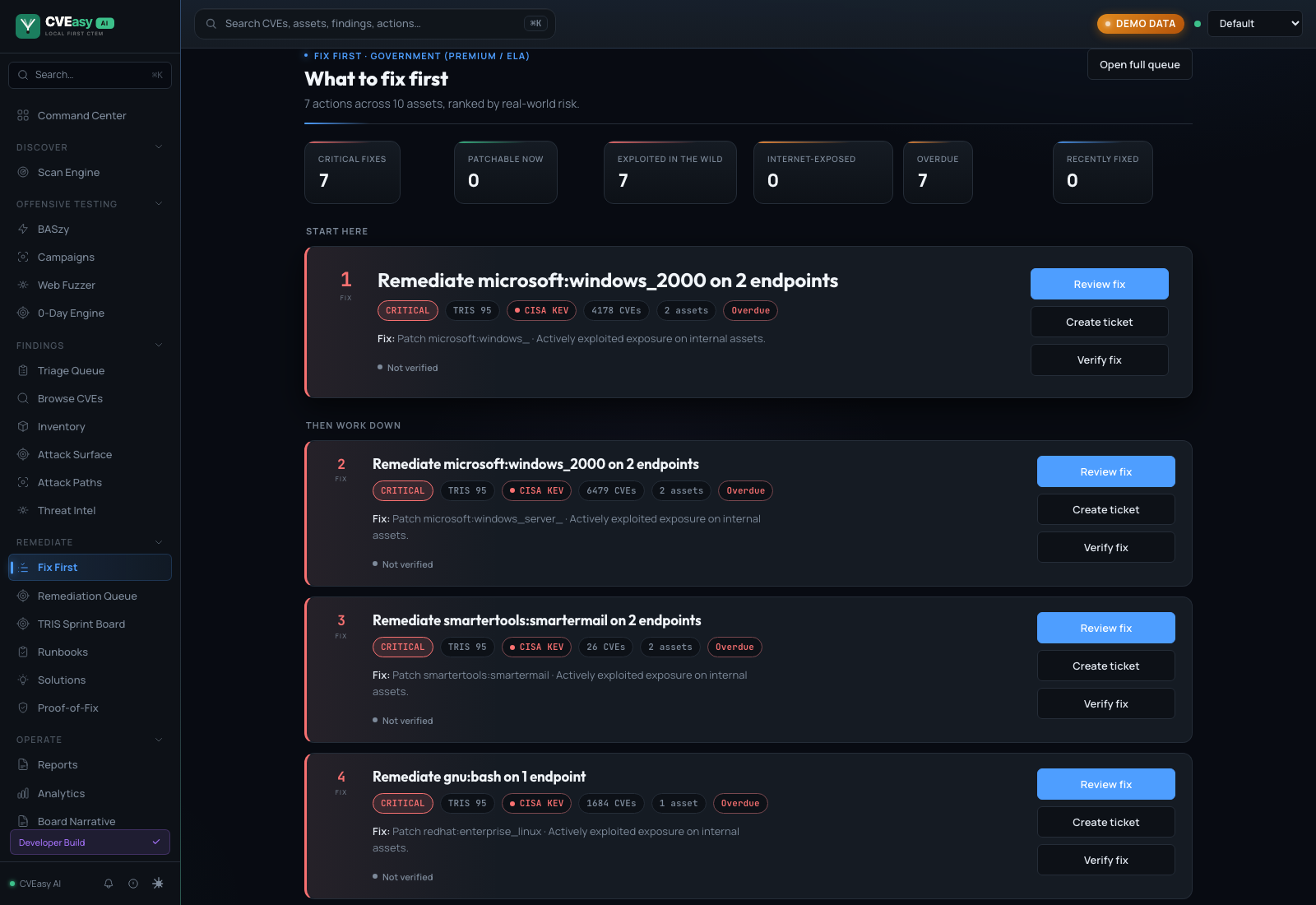
Fix First. The prioritized worklist: what to fix first, ranked by real-world risk, with Review, Ticket, and Verify on every card.
Closed loop: every action is audit-logged, and the next sync re-checks the exposure to confirm the fix landed. Notification events (Slack, Teams, Discord, PagerDuty) fire on deploy and on verified remediation.
Generate reports
See the report generator in the demo →Go to Reports under Operate in the sidebar. CVEasy generates professional reports in HTML and PDF, suitable for:
- Board presentations, executive summary with risk narrative
- Compliance audits, controls mapped to HIPAA, PCI-DSS, SOC 2, etc.
- Technical teams, detailed findings with remediation steps
- Vulnerability trending, how your posture has changed over time
Connect Claude via MCP
The native MCP server exposes your live instance to Claude Desktop and Claude Code as typed agent tools: CVE lookup, findings search, posture queries, TRIS score breakdowns, report rendering, and work-order creation. The server connects to your local instance, so exposure data stays on your hardware.
Install and configuration instructions live in the open-source repo: github.com/CVEasy/cveasy-mcp. CVEasy is an Anthropic Claude Network Partner.
Install for your client
The server is on npm as cveasy-mcp and needs Node 22 or newer. CVEasy AI must be running; the server only talks to it on 127.0.0.1:3001.
Claude Desktop
Download the extension bundle from the releases page and open it; Claude Desktop installs it and asks for the backend URL. Or add it by hand to claude_desktop_config.json:
{
  "mcpServers": {
    "cveasy": { "command": "npx", "args": ["-y", "cveasy-mcp"] }
  }
}
Claude Code
claude mcp add cveasy -- npx -y cveasy-mcp
Or install the plugin, which adds the server plus two TRIS skills: /plugin marketplace add CVEasy/cveasy-claude-plugin then /plugin install cveasy@cveasy-claude-plugin.
Cursor
Add to .cursor/mcp.json in the project or ~/.cursor/mcp.json globally:
{ "mcpServers": { "cveasy": { "command": "npx", "args": ["-y", "cveasy-mcp"] } } }
OpenAI Codex
Add to ~/.codex/config.toml:
[mcp_servers.cveasy]
command = "npx"
args = ["-y", "cveasy-mcp"]
VS Code (Copilot agent mode)
Add to .vscode/mcp.json:
{ "servers": { "cveasy": { "type": "stdio", "command": "npx", "args": ["-y", "cveasy-mcp"] } } }
Write tools and BASzy scan starts stay off until you set CVEASY_ALLOW_WRITES=1 or CVEASY_ALLOW_SCANS=1 in the server's env. Every call is audit logged.
Back up your data
Your CVEasy database contains all your vulnerability data, scan history, asset inventory, and configuration. Back it up regularly.
Manual backup
- Go to Settings → Backup
- Click Create Backup
- The backup is saved to
~/Library/Application Support/CVEasy AI/backups/ - Click Download to save a copy externally
Restore from backup
- Go to Settings → Backup
- Click Restore next to the backup you want
- A safety backup of your current data is created automatically
- Restart CVEasy AI to complete the restore
Backup location: ~/Library/Application Support/CVEasy AI/backups/
Copy this folder to external storage for disaster recovery.
How TRIS™ scoring works
TRIS™ v2 (True Risk Intelligence Score) is a proprietary 12-layer scoring engine that goes far beyond CVSS. Seven foundational and contextual layers plus five novel dimensions no competitor combines:
- CVSS Base Score, technical severity of the vulnerability
- EPSS Probability, likelihood of exploitation in the next 30 days
- CISA KEV Status, is this actively exploited in the wild?
- Threat Actor Targeting, are known APT groups using this CVE?
- Asset Criticality, how important is the affected asset?
- Public Exposure, is the asset internet-facing?
- BASzy Validation, was exploitability proven by attack simulation?
- Attack Path Blast Radius, how many assets can this reach via lateral movement?
- Supply Chain Propagation, how deep does the vulnerable dependency sit in your SBOM?
- Defense Efficacy, what share of the mapped MITRE ATT&CK techniques do your controls cover?
- Predictive Trajectory, is exploitation accelerating or decaying right now?
- Financial Impact, FAIR-based expected monetary loss
TRIS produces a score from 0-100 and assigns a priority band:
- ACT (90-100), remediate immediately, actively dangerous
- ATTEND (75-89), high priority, schedule remediation this sprint
- TRACK (50-74), monitor, remediate in next cycle
- MONITOR (25-49), low risk, track for changes
- INFORMATIONAL (0-24), noise, document and move on
The TRIS Sprint Board (under Remediate in the sidebar) groups every finding into its action band so prioritization is a glance, not a debate. Click any score chip to see the full 12-layer breakdown.
Compliance mapping
CVEasy maps every CVE to 86 controls across 9 compliance frameworks:
- HIPAA (11 controls)
- PCI-DSS v4.0 (15 controls)
- SOC 2 TSC (9 controls)
- ISO 27001:2022 (11 controls)
- NIST CSF v2.0 (8 controls)
- CIS Controls v8 (12 controls)
- FedRAMP / NIST 800-53 (13 controls)
- GDPR (4 controls)
- CCPA (3 controls)
Supported scanner formats
CVEasy accepts 13 file formats with automatic detection: Nessus, Qualys, Rapid7 InsightVM, OpenVAS/GVM, Nuclei, Burp Suite, OWASP ZAP, Aqua Trivy, Wiz, Prowler, Nmap, SARIF, and generic CSV (any scanner that exports CSV). Six of these tools also connect as native API clients for scheduled auto-sync, see Connect a Scanner or EDR.
Keyboard shortcuts
| ⌘K | Open search |
| ⌘/ | Toggle sidebar |
Attack Surface Canvas
The Live Attack Surface Canvas is an interactive network visualization that shows your entire infrastructure in one view. It is a proprietary feature unique to CVEasy AI, no other CTEM platform offers this.
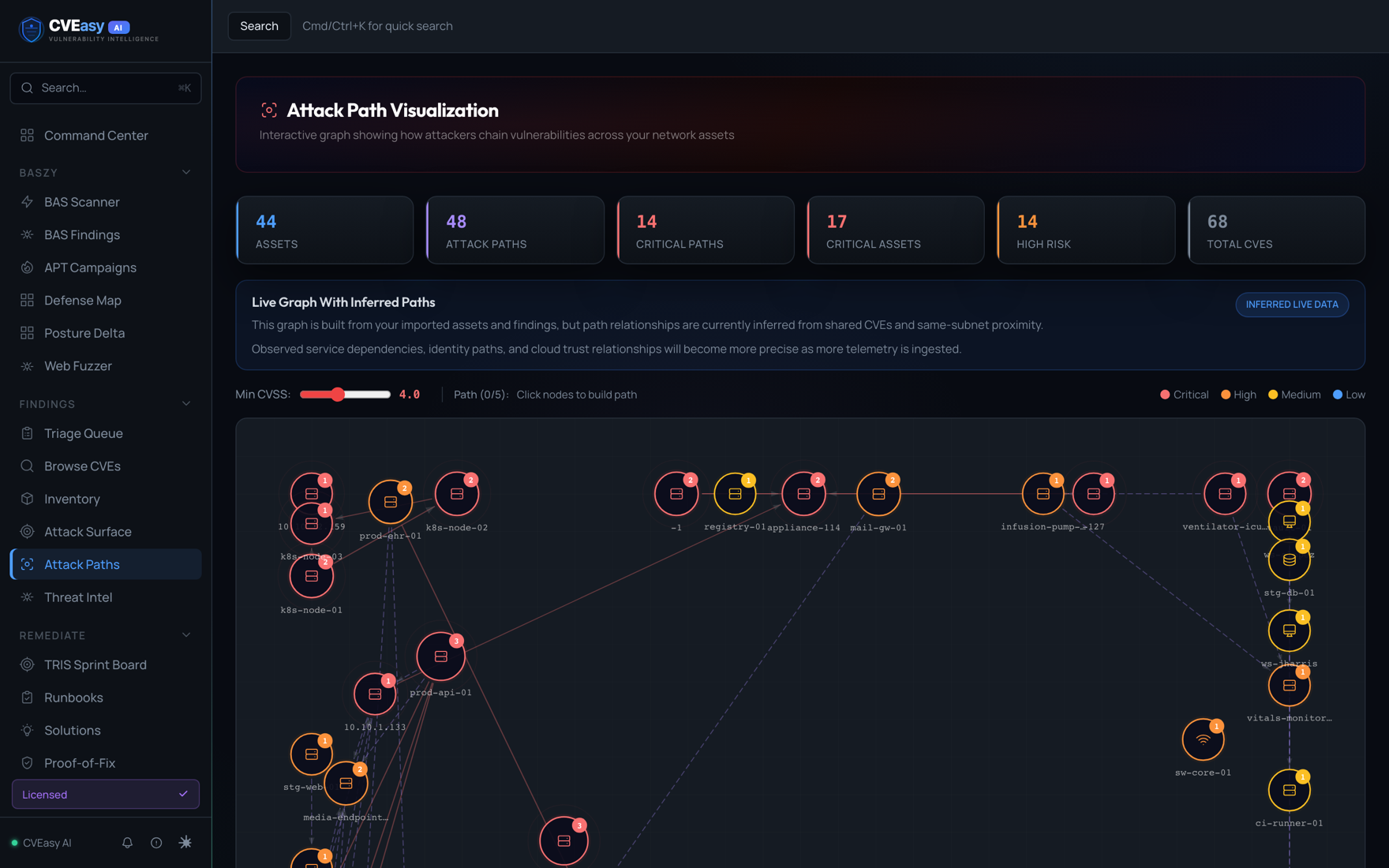
Attack Path Visualization. The graph chains your real findings into the paths an attacker would actually take to reach your crown jewels.
How to access
Navigate to Attack Surface in the sidebar. Click Network Map at the top right to switch from table view to the interactive canvas.
Understanding the canvas
- Nodes represent assets (servers, databases, workstations). Size indicates criticality. Color indicates risk level: red = critical, orange = high, yellow = medium, green = healthy, purple = crown jewel.
- Edges show network connectivity. Solid lines = same subnet. Dashed red lines = lateral movement paths (SSH, SMB, RDP, WinRM).
- Animated red dots trace attack paths from entry points to crown jewels, showing exactly how an attacker would chain techniques to reach your most critical assets.
- Subnet groups are shown as background regions with labels (e.g., 192.168.1.0/24).
Interacting with the canvas
- Click any node to open the detail panel (IP, OS, services, CVEs, attack paths)
- Drag nodes to rearrange the layout
- Scroll to zoom in/out
- Pan by clicking and dragging empty space
- Toggle lateral edges and attack paths using the toolbar buttons
- Reset View returns to the default zoom and position
Node badges
- PUB. Public-facing asset (internet-exposed)
- DC. Domain controller
- DB. Database server
- WEB. Web server
- Red number badge. CVE count on that asset
AutoFuzz engine
AutoFuzz is CVEasy AI's proprietary zero-day discovery engine. Unlike static attack libraries, AutoFuzz takes known payloads and generates novel variants using 37 mutation strategies. When a mutation bypasses a defense that blocked the original payload, that's a zero-day-class discovery unique to your environment.
How it works
- BASzy fires a known attack payload at a target (e.g.,
' OR 1=1--) - If the payload is BLOCKED by a WAF/EDR, AutoFuzz activates
- AutoFuzz generates encoded variants: URL encoding, Unicode escapes, HTML entities, null byte injection, comment injection, case swapping, and more
- Each variant is tested against the same target
- If a variant bypasses the defense, it's classified as a zero-day bypass and stored in the Zero-Day Vault
Mutation strategies
AutoFuzz includes 37 strategies organized into categories:
- Encoding: Base64, double Base64, URL, double URL, hex, Unicode, HTML entities, octal, UTF-7
- Case: Case swap, random case mixing
- Whitespace: Null byte injection, zero-width characters, tab replacement, newline injection
- Comments: SQL comment (
/**/), HTML comment (<!---->), JS comment injection - Splitting: SQL CONCAT, JS string concatenation, CHAR() function encoding
- Substitution: Cyrillic homoglyphs, fullwidth Unicode characters
- Context: HTML attribute wrapping, tag wrapping, JS string context, JSON prototype pollution, XML wrapping
- Polyglot: Cross-context XSS payloads
- WAF bypass: Chunked encoding, multipart wrapping
Strategy chaining
AutoFuzz automatically chains strategies (e.g., URL-encode + case-swap + comment-inject) to discover multi-layer bypasses that single-strategy approaches miss.
Remediation proof engine
The Remediation Proof Engine provides auditable evidence that your fixes actually worked. No other security platform offers closed-loop verification like this.
How it works
- Before: BASzy finds a vulnerability (UNDETECTED) and stores a baseline snapshot, the exact attack, payload, and evidence
- Fix: You apply the remediation (CVEasy AI generates the exact commands)
- After: Click "Verify Fix". BASzy re-runs the same attack with the same payload
- Proof: The engine compares before and after:
UNDETECTED -> BLOCKED = VERIFIED
Proof reports
Each verification generates an auditable proof containing:
- Before snapshot: attack payload, outcome (UNDETECTED), timestamp, evidence
- After snapshot: same payload, new outcome (BLOCKED), timestamp, evidence
- Remediation applied: the exact commands that were run
- Risk reduction classification:
critical_to_blocked,detected_to_blocked, etc.
Dashboard
The Remediation Proof Dashboard shows total proofs generated, verification success rate, breakdowns by asset and MITRE technique, and a list of pending baselines awaiting verification.
Detection rule export
When BASzy proves an attack bypasses your defenses, CVEasy AI automatically generates detection rules to catch it. Rules are generated in 6 formats:
| Format | SIEM/Tool | Use Case |
|---|---|---|
| Sigma | Universal (any SIEM) | Portable rules that translate to any platform |
| SPL | Splunk | Direct Splunk search queries |
| KQL | Microsoft Sentinel | Azure Sentinel analytics rules |
| EQL | Elastic SIEM | Elastic event query language |
| CQL | CrowdStrike LogScale | Falcon LogScale queries |
| Suricata | Suricata/Snort IDS | Network-level IDS rules |
How to export
After a BASzy campaign completes, go to the findings page. Each UNDETECTED finding has an "Export Detection Rules" button that generates rules in all 6 formats. Copy and paste directly into your SIEM.
SIEM integration
See the detection gap matrix in the demo →CVEasy AI can push findings, alerts, and detection rules to your existing security tools:
| Integration | Protocol | What It Sends |
|---|---|---|
| Splunk | HEC (HTTP Event Collector) | Findings, alerts, detection rules |
| Microsoft Sentinel | Log Analytics API | Findings as custom log type |
| Elastic SIEM | Elasticsearch API | Findings as indexed documents |
| CrowdStrike | LogScale Ingest API | Process, file, and network events |
| ServiceNow | Incident Table API | Auto-creates incidents from findings |
| Slack | Webhook | Rich alert messages with MITRE mapping |
| Microsoft Teams | Webhook | MessageCard alerts |
| Syslog | RFC 5424 (UDP/TCP) | Standard syslog messages |
| Generic Webhook | HTTP POST | JSON payload to any endpoint |
Configuration
Go to Settings -> Integrations to configure your SIEM connections. Each integration requires:
- Splunk: HEC URL and token
- Sentinel: Workspace ID and shared key
- Elastic: Elasticsearch URL and API key
- ServiceNow: Instance name, username, password
- Slack/Teams: Webhook URL
- Syslog: Host, port, protocol (UDP/TCP)
Posture scoring
See the 12-layer breakdown in the demo →CVEasy AI calculates a composite security posture score (0-100) from your BASzy results, weighted across 6 categories:
| Category | Weight | What It Measures |
|---|---|---|
| Endpoint Security | 25% | EDR detection rate, AV effectiveness |
| Network Controls | 20% | Segmentation, firewall rules, IDS effectiveness |
| Identity Security | 20% | Credential hygiene, MFA enforcement, privilege management |
| Data Protection | 15% | Encryption, DLP controls, exfiltration prevention |
| Resilience | 10% | Backup integrity, recovery capability |
| Visibility | 10% | Logging coverage, monitoring, alerting |
Grading
A = 90+, B = 80-89, C = 70-79, D = 60-69, F = below 60. Industry benchmarks are included for comparison (healthcare avg: 58, financial: 72, technology: 68, government: 55).
Ransomware readiness assessment
A dedicated assessment that tests your defenses against each phase of the ransomware kill chain:
- Initial Access Prevention, phishing detection, exposed service patching
- Execution Controls, script blocking, macro restrictions, application whitelisting
- Credential Protection. LSASS protection, MFA enforcement, credential rotation
- Lateral Movement Controls, network segmentation, admin share restrictions, SMB controls
- Discovery Detection, network scan alerting, AD enumeration detection
- Data Protection. DLP policies, staging detection, encryption at rest
- Exfiltration Prevention. DNS filtering, outbound monitoring, proxy enforcement
- Encryption Defense, ransomware behavior detection, file integrity monitoring
- Recovery Capability, backup integrity, offline backups, recovery time objectives
- C2 Detection, beacon detection, DNS tunnel identification, proxy enforcement
Each phase is scored and produces specific recommendations. Overall readiness levels: READY (80+), PARTIAL (60-79), AT RISK (40-59), CRITICAL (below 40).
System requirements
| Component | Minimum | Recommended |
|---|---|---|
| Processor | Apple M1 | Apple M2 Pro / M3 Pro or later |
| Memory | 16 GB unified | 36-64 GB unified |
| Storage | 15 GB free | 30 GB free (for scan data growth) |
| macOS | macOS 13 Ventura | macOS 14 Sonoma or later |
| Network | Not required (air-gap capable) | LAN access to scan targets |
| Display | 1440x900 | Retina display |
What's included in the DMG
- CVEasy AI application (Tauri desktop shell)
- Backend server (cveasy-server)
- BASzy attack engine (baszy-server)
- AI inference engine (llama-server, zero external dependencies)
- AI model (4.4 GB GGUF, optimized for Apple Silicon Metal GPU)
- CVE database (361,000+ CVEs pre-loaded)
- Attack payload database (158,271 validated payloads across 120 categories)
No Homebrew, Docker, Python, or cloud accounts needed. Everything runs from the app bundle.
Troubleshooting
App opens but shows a blank white screen
The backend server may still be starting. Wait 10-15 seconds for the AI engine to initialize. If the screen stays blank, check Console.app for errors from "CVEasy AI". Try quitting and reopening the app.
AI remediation is slow or not generating
The AI engine requires Apple Silicon (M1/M2/M3/M4) with Metal GPU acceleration. On 16 GB machines, the first generation may take 30-60 seconds as the model loads into GPU memory. Subsequent generations are faster (10-15 seconds). If generation fails completely, check that no other GPU-intensive apps are running.
BASzy scans find nothing
Check that: (1) Your target network is reachable from the machine running CVEasy AI. (2) EDR/firewall isn't blocking BASzy's scan traffic. (3) You've whitelisted CVEasy AI in your EDR. Try importing scan data from an existing scanner first to verify the pipeline works.
"Port already in use" error on startup
Another instance of CVEasy AI may be running. Quit all instances and try again. If the issue persists, run lsof -i :3001 in Terminal to find what's using the port, then kill [PID] to stop it.
Scanner import fails or shows 0 CVEs
Verify your scan file format is correct. CVEasy expects: Nessus (.nessus XML), Qualys (XML), Rapid7 (XML), OpenVAS (XML), Nuclei (JSON), Burp (XML), ZAP (JSON/XML), Trivy (JSON), or CSV with columns: ip, hostname, cve_id, port, severity. Check that the file isn't empty or corrupted.
License activation fails
The fastest path is the email retrieval on the License page: enter the email you used at checkout and CVEasy fills the key for you. If you are pasting a key manually, the format is CVEASY-XXXXX-... and it is case-sensitive. If your machine was recently reimaged or the hardware changed, contact sales@cveasyai.com for a key reset.
App crashes on macOS Sequoia
Ensure you're running the latest version of CVEasy AI. If the crash persists, right-click the app in Finder, select "Get Info", and ensure "Open using Rosetta" is NOT checked (CVEasy AI is native Apple Silicon). Report persistent crashes to support@cveasyai.com with the crash log from Console.app.
EDR whitelisting
BASzy performs authorized security testing that may trigger EDR/AV alerts. Whitelist the following before running attack simulations:
/Applications/CVEasy AI.app/Contents/MacOS/cveasy-ai
/Applications/CVEasy AI.app/Contents/MacOS/cveasy-server
/Applications/CVEasy AI.app/Contents/MacOS/llama-server
/Applications/CVEasy AI.app/Contents/MacOS/baszy-server
For platform-specific steps covering CrowdStrike Falcon, SentinelOne, Microsoft Defender, Carbon Black, and Sophos, contact support@cveasyai.com.
Frequently asked questions
Does CVEasy AI need internet access?
No. CVEasy runs 100% offline. The AI engine, CVE database (361,000+ CVEs), and all features work without internet. When online, it automatically syncs new CVEs from NVD, but this is optional.
Can I use my existing Nessus/Qualys scans?
Yes, two ways. 73 native API connectors (led by Rapid7 InsightVM, Tenable.io, Qualys VMDR, CrowdStrike, SentinelOne, and Defender TVM) pull live on an auto-sync schedule, and 43 file formats upload directly, including Nessus, Qualys XML, OpenVAS, Nuclei, Burp, ZAP, Trivy, Wiz, Prowler, Nmap, SARIF, and generic CSV. Assets are auto-created, CVEs auto-linked, and duplicates merged on asset identity.
What if I don't have a vulnerability scanner?
You don't need one. BASzy's built-in discovery engine scans your network, identifies assets, fingerprints services, and tests for vulnerabilities, all without external tools.
How is TRIS™ different from CVSS?
CVSS measures technical severity. TRIS™ v2 measures actual risk by combining 12 signals: CVSS, EPSS (weaponization probability), CISA KEV (active exploitation), threat actor targeting, asset criticality, public exposure, BASzy validation (proven exploitability), plus five novel layers, attack-path blast radius, supply-chain propagation, defense efficacy, predictive trajectory, and FAIR-based financial impact. A CVSS 7.5 that's being actively exploited by APT29 against your industry scores much higher than a CVSS 9.0 that's theoretical.
Is BASzy safe to run in production?
BASzy respects authorization levels. In "low_impact" mode (default), all tests are non-destructive, they detect vulnerabilities without exploiting them. Aggressive testing requires explicit authorization and is designed for dedicated test environments.
How do I back up my data?
Go to Settings → Backup → Create Backup. The backup includes your entire CVE database, scan history, asset inventory, findings, and configuration. Download the backup file to external storage for disaster recovery.
What hardware do I need?
Mac with Apple Silicon (M1/M2/M3/M4) and 16GB+ unified memory. Recommended: 36-64GB for the best AI performance. Apple Silicon (M1/M2/M3/M4) is required for the built-in AI engine.
Can multiple people use one installation?
Yes. CVEasy runs as a web application on your local network. Anyone on the same network can access it via browser at the server's IP address. Enterprise licenses support unlimited concurrent users.
How do I update CVEasy AI?
Download the latest DMG from your account and install over the existing application. Your database and settings are preserved, they're stored in ~/Library/Application Support/CVEasy AI/, not inside the app bundle.
What compliance frameworks are supported?
CVEasy maps to 86 controls across 9 frameworks: HIPAA, PCI-DSS v4.0, SOC 2 TSC, ISO 27001:2022, NIST CSF v2.0, CIS Controls v8, FedRAMP (NIST 800-53), GDPR, and CCPA. Each CVE shows which compliance controls it threatens.
Will BASzy trigger my EDR/antivirus?
It might, that's actually the point. BASzy tests whether your security controls detect attack techniques. If your EDR blocks a BASzy test, that's a PASS. If it doesn't, that's a gap to fix. For smooth operation, whitelist CVEasy AI in your EDR before running campaigns.